 TONELOUPE
What IRE should skin tones be?
The short answer everyone quotes: around 70 IRE. The useful answer: it depends on complexion, key light and intent — and the number matters far less than holding it steady across the cut.
The ranges
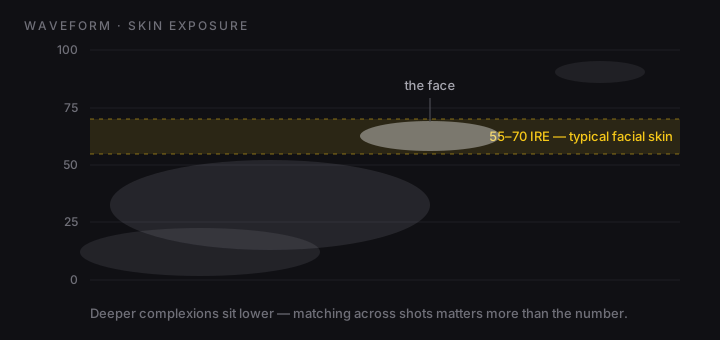
On a waveform (0 = black, 100 = clipping), facial skin under a normal key typically sits:
- Lighter complexions: ~55–70 IRE, the oft-quoted "70 IRE rule" being the bright end of normal.
- Medium complexions: ~45–60 IRE.
- Deeper complexions: ~30–50 IRE — and pushing them up "to hit 70" is how faces get that gray, washed-out look. Expose the face, not the rule.
Intent moves all of it: a moody night interior legitimately puts a face at 25 IRE, a high-key commercial at 75. The ranges are a sanity check, not a law.
The number that actually matters: the delta
Viewers don't know what IRE a face is at. They instantly feel a face that jumps — 48 in the wide, 63 in the close-up, and the scene stops feeling like one scene. Shot-to-shot consistency is the real deliverable; the absolute value is a creative choice you make once per scene.
How to actually measure a face
- Isolate it. A whole-frame waveform buries the face's trace in walls and wardrobe. Crop the scope input to the face, or use a region-reading tool.
- Read the forehead/cheek mass, not specular highlights (nose, forehead shine) — those legitimately ride 10–20 IRE above the skin mass.
- Check it after the look. LUTs move exposure too; measure the face on the output, not the source.
ToneLoupe makes this the ambient kind of check instead of a ritual: its exposure heatmap paints the skin-target band directly on the face (false color, explained), so a face sliding out of its band changes color on screen the moment it happens — in your NLE or anywhere else on your Mac.
Exposure heatmap with the skin target on the yellow band, plus skin-line false color and live scopes — over any app.