 TONELOUPE
The vectorscope skin-tone line, explained
Open the vectorscope in any serious grading tool and you'll find a thin diagonal line running between the red and yellow targets. It's the single most useful reference in color grading — because it's the one place where human biology hands you an objective answer to a subjective question.
What the vectorscope shows
A vectorscope throws away brightness and plots every pixel of the image by hue (the angle around the circle) and saturation (the distance from the center). A neutral gray image collapses to a dot in the middle. A saturated red frame throws a spike toward the R target. A normal image makes a soft cloud whose shape tells you, at a glance, where the color in the frame lives.
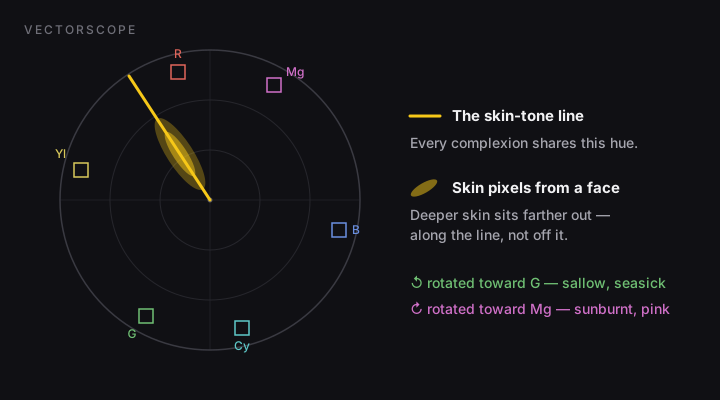
Why all skin falls on one line
Here's the remarkable part. Plot faces from every ethnicity on a vectorscope and the skin pixels stack along nearly the same hue angle — the line between red and yellow. Complexions differ enormously in luminance (how dark) and saturation (how far out along the line), but barely in hue, because skin color everywhere is produced by the same two pigments: melanin in the skin and hemoglobin in the blood beneath it. More melanin moves you along the line, not off it.
Deeper or lighter complexions travel along the skin-tone line. Only a color error moves skin off it.
That's why the line earned a permanent place on the scope graticule (you'll hear it called the flesh line or I-line, since it roughly coincides with the I axis of the old NTSC I/Q system). It turns “does this face look right?” — a question your adapted eyes answer badly — into “is the cloud on the line?”, which anyone can answer in a second.
How to use it while grading
- Isolate the face. This is the step everyone skips. A whole-frame vectorscope mixes skin with wardrobe, walls and sky, so a subtle facial drift disappears into the cloud. Use your NLE's crop/window to feed the scope just the face — or a region-scope tool (that's what ToneLoupe is) so you don't have to touch the grade to measure it.
- Look at the angle of the skin trace. On the line: natural. Rotated toward yellow/green: sallow, seasick — usually white balance or a green-heavy look. Rotated toward red/magenta: sunburnt or over-corrected — often an overdone tint slider.
- Correct hue first, saturation second. Rotate skin back onto the line (hue vs hue curve, tint, or a keyed secondary), then decide how saturated you want it. Distance from center is taste; the angle mostly isn't.
- Re-check after every look you apply. Creative LUTs and film emulations routinely drag skin off the line. The look can stay — skin usually needs a small secondary pulling it back.
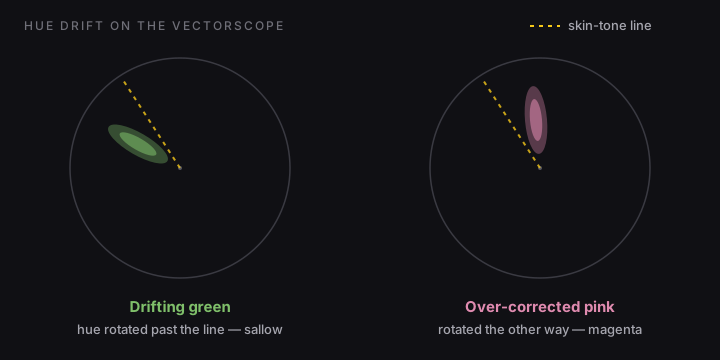
When the line lies to you
- Mixed light on the face. A cheek lit by window light and a jaw lit by a tungsten practical produce two traces. Scope them separately; don't split the difference.
- Makeup, blush and lipstick sit intentionally off the line. Measure forehead and cheekbone, not lips.
- Strong creative intent. A teal-orange blockbuster look parks skin slightly warm of the line on purpose. The line is a reference, not a law — but you should know you're off it, and by how much, rather than discover it in client review.
- Saturation says nothing by itself. A face can sit perfectly on the line and still be over- or under-saturated for the look. The line answers “what hue”, not “how much color”.
The catch: scopes live in one app
Resolve, Premiere and Final Cut all draw the line for you — inside their own viewer, reading the whole frame. The moment you're judging skin anywhere else (a still export, a client review page in a browser, a photo in Lightroom — which has no vectorscope at all), you're back to eyeballing.
ToneLoupe exists for exactly that gap: a floating loupe that scopes whatever is under it, in any app, and paints the verdict as false color on the face itself — yellow on the line, green or pink off it — with a live region-only vectorscope and RGB parade beside it.
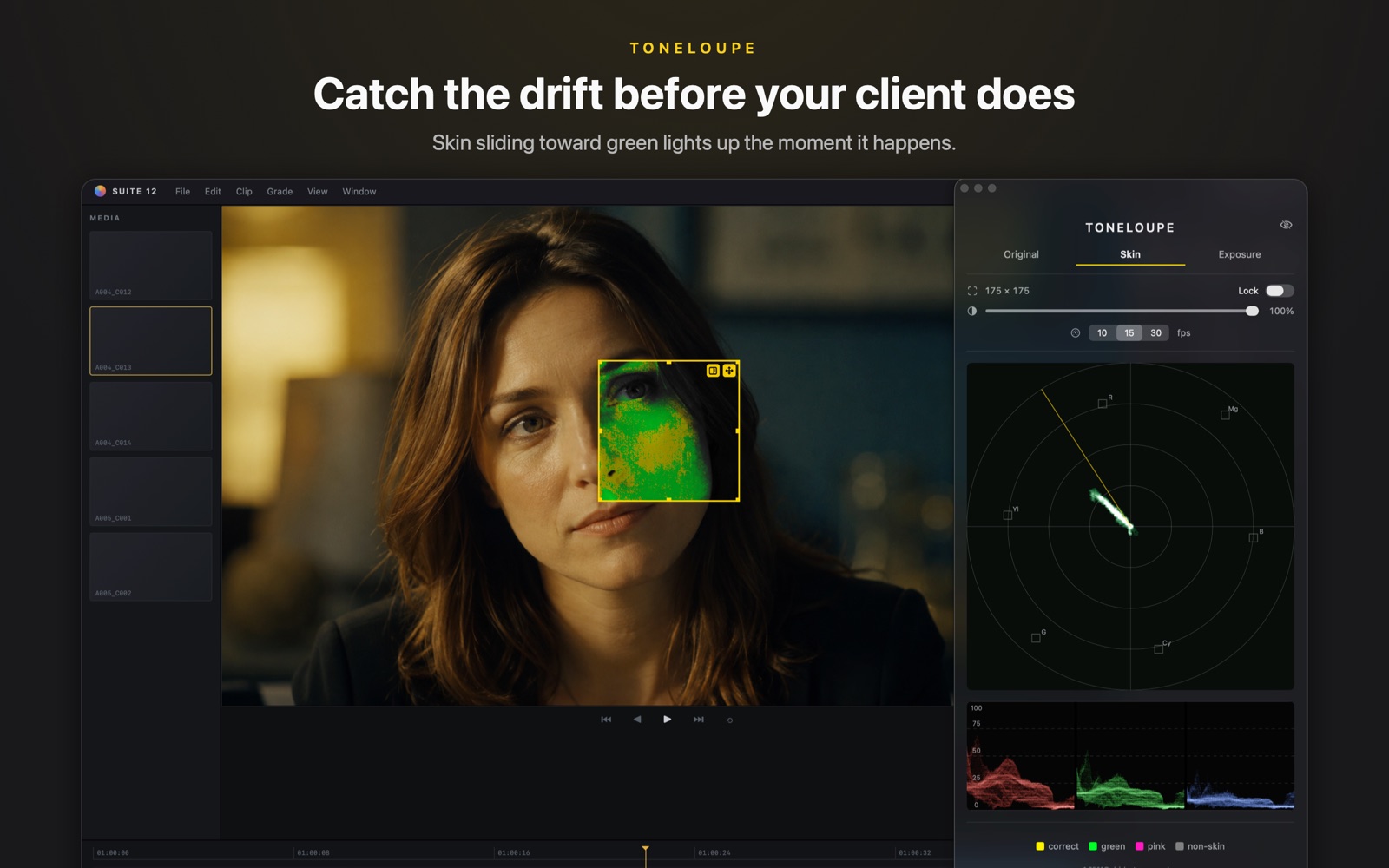

A floating loupe that reads the pixels under it live: skin-line false color on the image, vectorscope and RGB parade of just that region. Works over your NLE, browser, anything.