 TONELOUPE
Why your video looks different on YouTube
You grade for hours, export, upload, and the published video looks washed out, duller, or just off. It's not your imagination and it's usually not YouTube "ruining" your video. Three specific things happen between your timeline and the viewer's screen.
 ToneLoupe measures the video your viewers actually see,
right on the YouTube page. Free 7-day trial →
ToneLoupe measures the video your viewers actually see,
right on the YouTube page. Free 7-day trial →
Cause 1: the gamma tag lottery
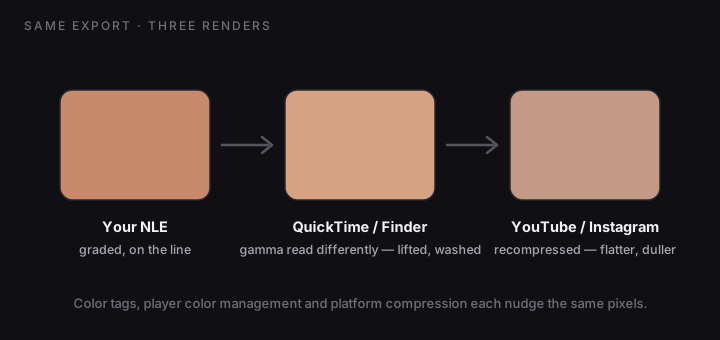
Your export carries metadata tags describing its color space and gamma. Different players interpret those tags differently. Hence the famous "QuickTime gamma shift": the same file looks lifted and washed out in QuickTime Player and Finder previews compared to your NLE's viewer. If you panic-regrade because Finder looked flat, you've now broken the file for everyone else. Rule: judge exports in the destination player, never in Finder's preview.
Cause 2: browser and display color management
Browsers, operating systems and displays each apply their own color management. A P3 MacBook screen, a cheap office monitor and a phone will render the same upload differently, and an HDR-capable phone may tone-map it again. You can't control the viewer's screen; you can only deliver a technically clean standard file (Rec.709, correctly tagged) and know what it looks like on the platforms that matter.
Cause 3: platform recompression
YouTube and Instagram re-encode everything. Heavy compression eats fine gradients and can leave the image feeling slightly flatter and less saturated than your master, subtle on good sources and ugly on noisy ones. Give the encoder a clean, high-bitrate master and the loss stays invisible; there is no export setting that "prevents" re-encoding.
Stop guessing: measure the upload itself
Here's the step almost nobody does, because scopes live inside NLEs: scope the published video. ToneLoupe floats over any app, including a browser, so you can play your YouTube upload, park the loupe on a face, and compare its vectorscope and RGB parade reading against the same shot in your NLE. Now "it looks washed out" becomes a number: the same face at 63 IRE in the timeline and 67 on the upload tells you it's the gamma tag; identical readings tell you the file is fine and the difference is your adapted eyes or the viewing screen. Measure first, and regrade only if the numbers say so.
Skin false color, vectorscope and RGB parade over any app: your NLE, QuickTime, and the YouTube page itself.